Multiple Feeds from Platform/Provider

Where we have accounts sitting under different financial advisers, do we need an ESI/EPI from each planner? e.g. we have multiple accounts with Hub24 under one financial adviser, but we have one account with a different financial adviser. We have a feed set up at the platform level using one of their EPIs, but what about the other one(s)? Surely the EPI is only specific to the accounts held under that adviser? We have tried to setup a second feed for Hub24 with the other EPI but it won't let us save it. Is this possible? How do we go about it?
-

Hi Kristy,
If you have multiple advisors, then yes, you will need to add another advisor by heading to Connect > Feed Management and clicking on the 'Advanced Options & Reports' button. Then select Provider Settings.
 From there click add new and fill out the advisors details including the, repeat until all advisors have been added.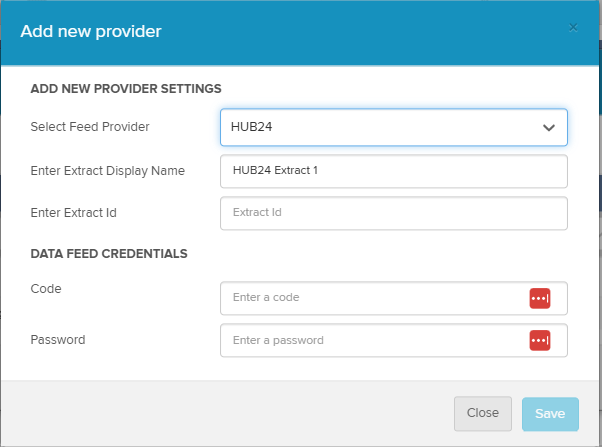
If you are still unable to save another advisor, I recommend logging a support call, as the support team can investigate further.I hope the above answers your post and if there are any further questions please reply to let me know so I may assist further.
0
Please sign in to leave a comment.
Comments
1 comment